
 timothyandClaude Fable 5.1
4e042fb7de
timothyandClaude Fable 5.1
4e042fb7de
Round one measured three defects in the first commit.

onAutoplayBlocked fired on ANY rejected video.play(), so the panel could
say "autoplay was blocked" when it was not. A play() interrupted by
teardown rejects with AbortError — which is exactly what the panel's own
Retry produces while the MANIFEST_PARSED play() is still pending — and
because the element was muted, a genuine NotAllowedError is the rare
case, so the realistic firings were the mislabelled ones. Report only a
DOMException named NotAllowedError, on both the MSE and native paths.

`muted` was applied to the shared player unconditionally, which silently
muted the playback-troubleshooting screen — the tool whose job includes
verifying the audio side of an FFmpeg profile, and which the legacy
Blazor player never muted. Make it an opt-in `muted` prop defaulting to
false; the channel preview passes it, troubleshooting does not, and a
test on each side pins its own value.

The two clauses hiding the hint once playback starts masked each other:
removing either alone left the panel suite green. Every path back to
'starting' (Retry, a channel change) already clears the flag itself, so
the clear in onPlaying could never be the load-bearing guard — drop it
and let the `state === 'starting'` render guard be the single pinned one.

Also cover the native-HLS (Safari) branch, which no test had ever
executed: its play() kick, its playing/error wiring, and both autoplay
rejection names.

Co-Authored-By: Claude Fable 5.1 <noreply@anthropic.com>
Claude-Session: https://claude.ai/code/session_015QqCpYFsKgnAnx6jVwrKiV
ErsatzTV
ErsatzTV lets you transform your media library into a personalized, live TV experience - complete with EPG, channel scheduling, and seamless streaming to all your devices. Rediscover your content, your way.



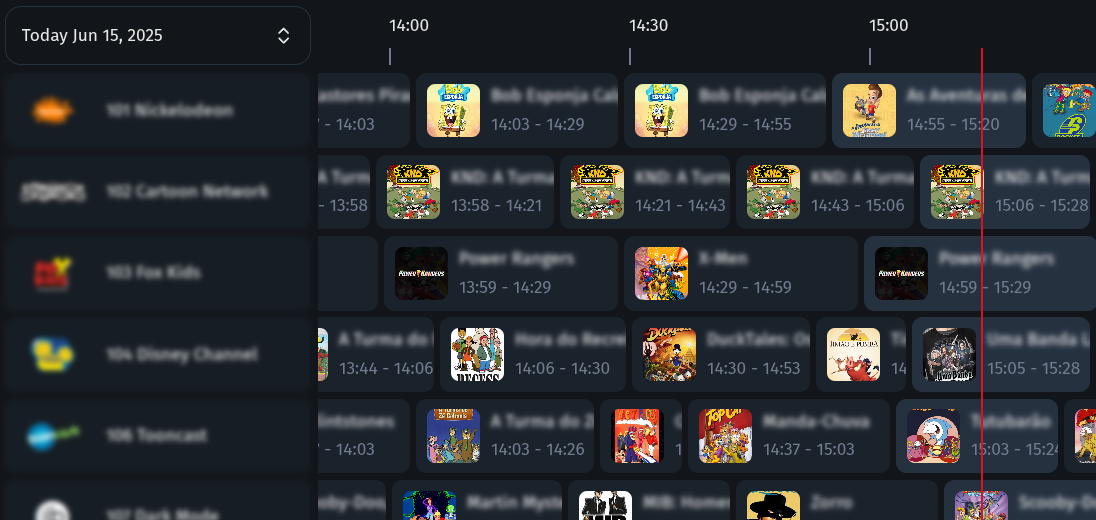
How It Works
- Install ErsatzTV: Download and set up the server on your system.
- Add Your Media: Connect your media libraries and collections.
- Create Channels: Design and schedule your own live channels.
- Stream Anywhere: Watch on any device with IPTV and EPG support.
Key Features
- Custom channels: Create and schedule your own live TV channels.
- IPTV & EPG: Stream with IPTV and Electronic Program Guide support.
- Hardware Transcoding: High-performance streaming with hardware acceleration (NVENC, QSV, VAAPI, AMF, VideoToolbox)
- Media Server Integration: Connect Plex, Jellyfin, Emby and more.
- Music & Subtitles: Mix music videos and enjoy subtitle support.
- Open Source: Free, open, and community-driven project.
Documentation
Documentation is available at ersatztv.org.
License
This project is inspired by pseudotv-plex and the dizquetv fork and is released under the zlib license.